From Noticeboard to Web Page: The Changing Shape of Public Notices
Public notices online are easier to search and share, but their changing format affects who sees them, how quickly, and where the official record lives.
Public notices online are easier to search and share, but the move from a noticeboard to a web page has changed more than the location of an announcement. It has altered how residents encounter official information: once by passing a physical display, now often by knowing which website, email list, or search term to check.
A notice is a public signal that an institution has made information available under a formal process. Depending on local rules, it may announce a meeting, a hearing, a proposed change, a filing, or another action that residents may need to know about. Its practical value depends not only on what it says, but on whether people can find it, understand its status, and follow its links to fuller records.
From display to discovery
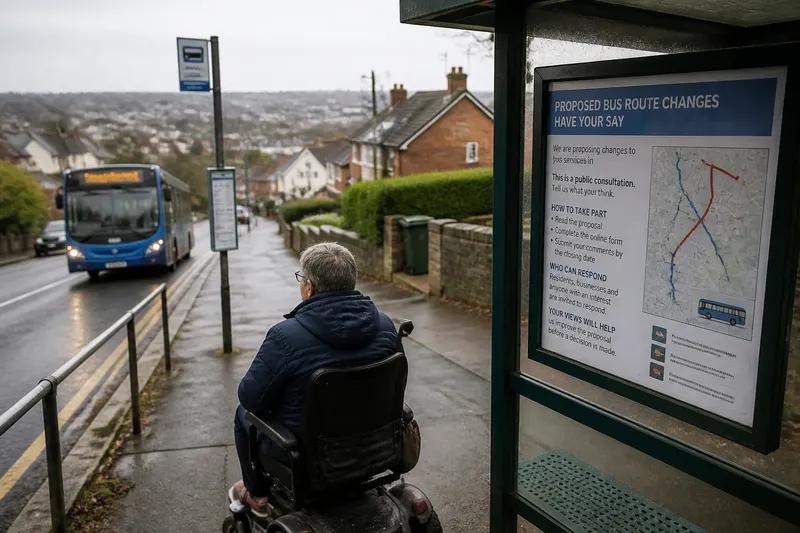
A paper notice on a municipal hall board had a fixed address. A resident entering the building could see what had been posted nearby, and the display made the notice’s presence tangible. But access depended on proximity, opening hours, and the habit of looking at that particular board. Someone who did not visit the building might never encounter it.
Moving notices online loosened that physical constraint. A public page can be reached from home, shared by email, and searched by place or topic. Yet the fixed board has often been replaced not by one universal digital wall, but by a scattered set of pages: a clerk’s notice archive, a department news feed, a calendar, and attachments stored in a document system.
The shift is therefore from being near a display to knowing where and how to look. A page may be technically public and still be difficult to discover if its title uses administrative language, its archive is buried, or search results favor a later update over the original notice.
What a notice carries
Notices often do two jobs at once. They announce an event or action, and they create a trace showing that information was made public. In the first role, the notice is a prompt for residents; in the second, it belongs to an official record. Digital publishing can make those roles appear to merge, even though a social media post or newsletter link may simply point toward the formal notice.
The wording usually gives a reader a starting point: the public body responsible, the matter being addressed, the relevant time or deadline, and a route to additional material. The attached report, map, application, or draft may contain the substance that a short notice cannot fit. A notice should not be mistaken for the complete account of a decision or proposal.
Digital notices also carry clues about their status. A date of posting, a revision marker, a downloadable file name, or a link to an archive can help distinguish an original announcement from a correction or a later document. When pages change without a visible history, readers may find it harder to tell what was available at an earlier point.
Uneven routes online
Online access can reduce some barriers while creating others. A resident who cannot easily travel to a government building may be able to open a notice remotely. A person using a phone, assistive technology, a slow connection, or a language other than the page’s default may face a different set of obstacles.
Format matters. A notice embedded as text on a page can often be searched and copied more readily than a scanned image. A PDF may preserve the layout of a formal document, but a file with poor text recognition can be difficult to search or read aloud with assistive software. A page that works only through a complicated menu can make a public record feel effectively hidden.
Digital distribution also changes the role of intermediaries. A neighborhood group, library, local journalist, or community organization may forward a link and add context. That can bring a notice to people who would not visit the agency’s site, but the forwarded summary is not necessarily the authoritative version. The link back to the public body matters.
Public access is strongest when a notice can be found through more than one ordinary route, such as a clear archive, a searchable page, and a direct link from a relevant department. If you are trying to locate one, search the public body’s name with the subject and terms such as “notice,” “hearing,” or “public comment,” then check the agency page itself.
Finding the authoritative page?
Where should I look first?
Start with the website of the public body responsible for the matter, then look for its notices, clerk, records, or public meetings section. A search engine can help locate a page, but confirm that the page belongs to the relevant agency and is not only a repost.
How can I tell if a notice changed?
Compare the page’s posting or revision dates with the attached document’s date and file name. If the page does not show a clear history, save the link and ask the responsible office which version is current and whether an earlier notice remains available.
What if the linked file will not open?
Try the agency’s document archive or contact the office named on the notice to request an accessible copy or another format. A broken link does not necessarily mean the underlying record is unavailable, but it does leave a gap worth reporting.
Does a shared post count as the official notice?
Not necessarily. A post or email can alert residents, while the formal notice may be maintained on a separate agency page or in a designated record system. Follow the link and check the public body’s own page for the source document and any updates.
When a link is not enough
A digital notice can be easy to forward and still lose context along the way. A short post may say that a proposal is open for comment without explaining which version is under consideration or where the supporting documents sit. The first click is useful, but the next question is whether it leads to the underlying material and the office responsible for it.
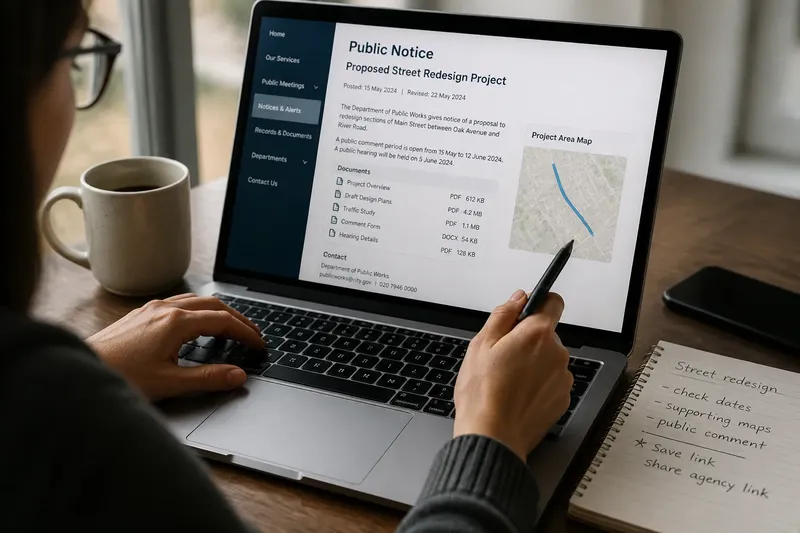
Imagine a resident sees a shared link about a street redesign. The link opens a department page with a notice, a map, and a downloadable draft; the resident checks the dates, saves the page, and sends the direct agency link to a neighbor rather than forwarding only a cropped image. The observable result is that both people can refer to the same source and see the same supporting files, even if one first encountered the issue through a community post.
This does not require treating every notice as a puzzle. It means paying attention to source, date, and connection: who issued it, when it was posted or revised, and where the referenced records can be read. Those small details help prevent an old announcement or detached screenshot from standing in for the current public information.
Keeping a usable trail
Paper notices left a visible object in a known place; online notices can leave a trail spread across pages and files. A reader who needs to revisit an issue can keep a simple record of the notice URL, the date viewed, and the names of linked documents. A bookmark or saved PDF may help, but neither replaces checking the agency page for later changes.
Public bodies can make that trail clearer by keeping a stable notice archive, using descriptive page titles, preserving earlier versions where appropriate, and making documents accessible as text. Residents can also help by reporting dead links or inaccessible files to the office responsible, naming the page and document rather than sending only a general complaint.
The most useful way to read public notices online is to treat them as entry points, not as the whole record. Search for the public notices page when you need it, follow the links to the source materials, and note what version and date you are reading. The web page has widened the possible route into civic information; a clear route still has to be built and maintained.